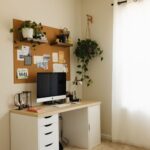


Creating an organized home office can make a significant difference in how productive and comfortable you feel throughout your workday. Whether you’re working remotely full-time or just need a dedicated space for occasional tasks, a well-arranged workspace helps reduce stress, improve focus, and keep your work running smoothly. In this post, we’ll share practical tips to organize your home office so you can enjoy a more efficient and pleasant work environment.
1. Choose the Right Location
Start by selecting a spot in your home where you can focus without many distractions. Ideally, this space should have:
– Good natural light to reduce eye strain
– Enough room for your desk, chair, and other essentials
– Some privacy to keep noise and interruptions minimal
Even a small corner can become a productive office with the right setup.
2. Invest in Ergonomic Furniture
Comfort is key for working long hours. An ergonomic chair and desk setup support your posture and help prevent discomfort or injury. Consider these points:
– Use a chair with adjustable height and lumbar support
– Position your computer screen at eye level to avoid neck strain
– Keep your feet flat on the floor or on a footrest
An organized home office isn’t just about neatness—it’s also about creating a healthy workspace.
3. Declutter and Simplify
A clutter-free desk helps clear your mind and reduces distractions. Follow these strategies:
– Keep only daily essentials on your desk like your computer, notepad, and a pen
– Store other items like files, books, and supplies in drawers or shelves
– Regularly sort through your materials and remove what’s no longer needed
You might be surprised how much focus you gain by simply clearing your workspace.
4. Use Storage Solutions
Good storage can keep your office tidy and accessible. Think about:
– Shelving units for books and binders
– Drawer organizers for small items such as paper clips and sticky notes
– Clear boxes or baskets labeled for miscellaneous supplies
Having a place for everything means less time searching and more time working.
5. Organize Cables and Electronics
Tangled cables look messy and can be distracting. To organize them:
– Use cable clips or sleeves to group wires together
– Label chargers and cords for easy identification
– Position power strips within easy reach but out of sight if possible
A clean setup not only looks better but helps you avoid accidental unplugging or damage.
6. Create an Inspiring Environment
Make your office a place you enjoy being. Personal touches can improve comfort and motivation:
– Add plants for a fresh and calming vibe
– Hang artwork or photos that make you feel positive
– Use a desk lamp for focused lighting during evening work
A welcoming space encourages you to sit down and get started.
7. Plan Your Workflow with Zones
Divide your office setup into zones to boost efficiency:
– Work zone: Your main desk area with your computer and writing space
– Reference zone: Shelves or bulletin boards with important info and calendars
– Supply zone: Storage for stationery and other tools
By clearly defining areas, you reduce the time and effort spent switching between tasks.
8. Maintain Your Workspace
Organization is an ongoing process. Keep your home office in top shape by:
– Setting aside a few minutes at the end of each day to tidy up
– Weekly dusting and cleaning to keep surfaces fresh
– Revisiting your setup periodically to make adjustments as needed
A little daily care goes a long way in maintaining comfort and productivity.
Final Thoughts
Organizing your home office is not just about making it look neat—it’s about creating a space that supports your best work. By choosing the right location, investing in ergonomic furniture, decluttering, and personalizing your area, you can enjoy a comfortable and productive workday at home. Follow these tips, and transform your workspace into an efficient and pleasant place to be.